Kavanati — Help & User Guide
Last updated: 5 October 2026 · current version 1.14.2
Kavanati is young and can get a word wrong. If you hit a bug or an odd case, tell us — every report helps us a lot.

1. Getting started
Windows: run Kavanati-windows.exe. The first time, Windows SmartScreen asks for a confirmation
because the app is new: click More info → Run anyway. The icon appears in the system tray, and from then on
Kavanati starts with Windows (you can turn that off in the menu: Settings → Start with Windows). That's it: just
type.
macOS: open the zip, drag Kavanati.app to Applications and open it. Allow
Accessibility and Input Monitoring in System Settings → Privacy & Security, and Kavanati starts
working on its own. The icon appears in the menu bar.
Keyboard layouts: Kavanati works with the standard Hebrew keyboard layout on Windows and Mac, together with English. With phonetic (Hebrew-QWERTY) or other non-standard Hebrew layouts, automatic fixing is paused for now, so correct text is never flipped by mistake.
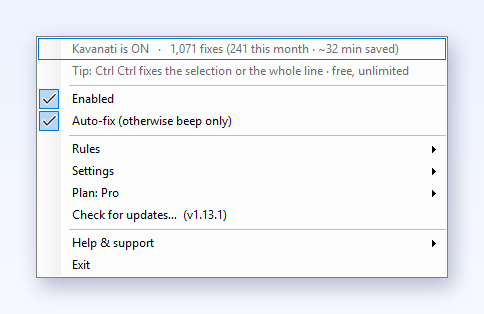
2. The automatic fix
Kavanati watches which keyboard layout is active while you type. When a word only makes sense
in the other language (you typed akuo but meant שלום), it deletes the gibberish,
switches the layout, and retypes what you meant, instantly. Real words are never touched: if what
you typed is a legitimate word in the language you typed it in, Kavanati assumes you meant it.
Password fields are always skipped.
Why a fix sometimes waits a word or two. Many short words read fine in both languages
(cut is also בוא, no is also מם). Kavanati won't guess on those, because a wrong guess
would change something you meant. It keeps typing them as they are until a word arrives that settles which language
you're in, and then fixes the whole run at once: two or three words switch together. That's on purpose, not a delay.
If you'd rather not wait, select the text and use the fix shortcut (section 3).
Manual fix: free, unlimited, one key
The manual fix works on every plan, including Free after the trial, with no daily count.
- Whole line: with nothing selected, press Pause (Windows) or ⌘P (macOS), or double-tap Ctrl. The entire line converts, numbers and correct words untouched (section 3).
- Selected text: select it first, then press the same key. The selection flips to the other layout every time, in both directions, even when it reads fine as-is.
- Undo: Ctrl+Z (Mac: ⌘Z) right after an automatic fix reverts it in a single press.
- Protect a word: undo the same word twice with the fix shortcut and it joins your protected words for good (section 4).
3. Fix a whole line at once
Typed a full sentence before noticing? One shortcut converts the entire line, numbers and correct words untouched:
- Windows: double-tap Ctrl, or press Pause; choose which under Settings → "Manual fix shortcut" in the tray menu.
- macOS: press ⌘P or double-tap Ctrl (also in the menu: "Fix whole line / flip selection / undo").
Selected text always flips. With no selection, Kavanati converts only what clearly reads as wrong-language typing: a rare word whose flipped form isn't a real word in either language is left alone. Text you select first is an explicit order: the shortcut flips it to the other layout every time, in both directions, even when it reads fine as-is. So if a word "refuses" to convert, select it and hit the shortcut.
The manual fix is free, unlimited, forever. Select text (or nothing, for the whole line) and press the shortcut: it works on every plan, including Free after the trial, with no daily count. Plenty of people live with just that. Pro adds unlimited automatic fixing on top.
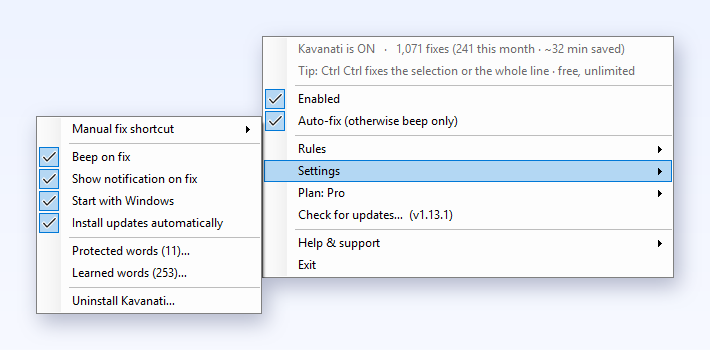
4. Undo, and protected words
Fixed something you actually meant? Two ways back:
- Ctrl+Z (Mac: ⌘Z) right after an auto-fix reverts it in a single press, and auto-fix waits quietly until you start a new sentence, so it never fights your undo. Any later Ctrl+Z goes to the app as usual.
- The fix shortcut (double-tap Ctrl / Pause / ⌘P) right after a fix also restores what you typed. The first time, Kavanati leaves that word alone for the rest of the session; undo the same word this way a second time (even on another day) and it joins your protected words for good.
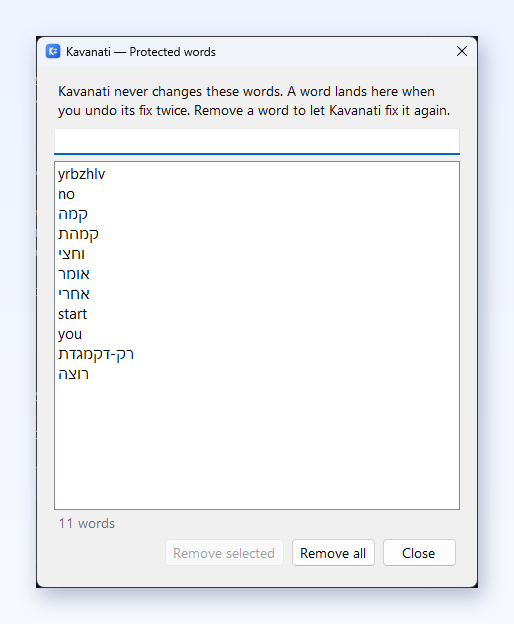
Settings → Protected words… opens the list, newest first, with a search box: select words and click Remove selected (or press Delete) to let Kavanati fix them again, or remove them all.
Why wasn't my word fixed?
Almost always it is one of these five, and Kavanati now tells you when it is the first one:
- The word is in your Protected words. If a word was left as typed only because its fix is protected, and the text around it is clearly in that language, a notice appears: "rumv" was not fixed because "רוצה" is in your Protected words · click to fix it and remove it from the list. One click removes the word and, if you haven't typed anything since, fixes it on the spot. A notice shows at most once per word per day.
- Where it came from. Settings → Protected words… shows next to every word whether you added it or Kavanati did (added automatically after two undos, with the date). When two undos protect a word, Kavanati says so and one click cancels it. Everyday words are never protected by undos alone, and an automatic protection that keeps blocking fixes removes itself after three times. A word you added yourself stays until you remove it.
- A rule for this app. In Settings → All rules… an app can be set to English only or Off (and your organization can switch apps off for everyone).
- The free plan's daily limit. After the free trial, the free plan fixes a set number of words a day. The manual fix (double-tap Ctrl) is always free and unlimited.
- A password field. Kavanati never fixes password fields, or anything typed there.
Right after you undo a fix with Ctrl+Z, auto-fix also waits until you start a new sentence. That is deliberate.
5. The personal dictionary
Kavanati learns your vocabulary, on your device: type a word that isn't in its dictionary three times and it becomes part of your personal dictionary. Your slang, names and jargon stop being "corrected", and even their wrong-layout gibberish starts fixing back to them. Everything stays in a local settings file. Settings → Learned words… lists them, most used first, with a search box: remove a word that was learned by mistake, or all of them. Learning new words is part of Pro (and of the first 7 days); words already learned keep working on the free plan.
6. Rules: where you only type English
Open the menu → Rules → All rules…. One window holds everything:
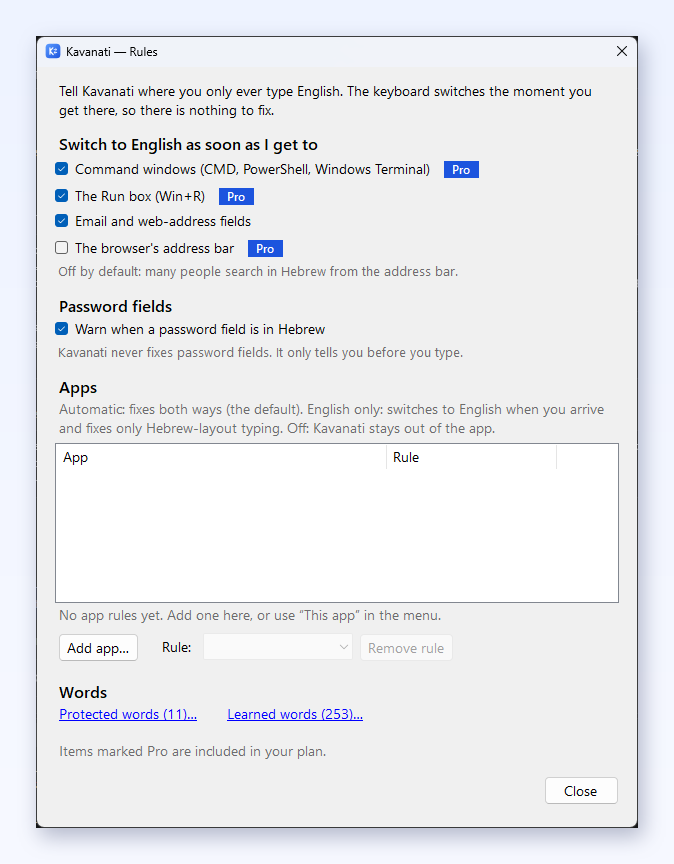
- Switch to English as soon as I get to: command windows (CMD, PowerShell, Windows Terminal, Terminal, iTerm…), the Run box (Win+R, Windows), email and web-address fields, and, if you want it, the browser's address bar (off by default, because many people search in Hebrew from it). The keyboard switches the moment you arrive, so there is nothing to fix.
- Password fields: Kavanati never fixes them, but it can warn you when a password field gets focus while the keyboard is in Hebrew, before you type a password in the wrong language.
- Apps: give any app a rule. Automatic (default) fixes both ways. English only switches to English when you arrive and fixes only Hebrew-layout typing. Off keeps Kavanati out of the app (manual fixes still work).
For the app you are in right now, Rules → This app sets it in one click. App rules, email and web-address fields and the password warning are free on every plan. Switching on arrival in command windows, other English-only apps, the Run box and the address bar is part of Pro, and runs during the free trial.
7. Updates
Kavanati checks for new versions automatically (its only automatic network request, apart from license checks on paid plans), downloads an update in the background, verifies it, and offers a one-click restart. You can always check manually via "Check for updates…".
8. Plans, the free trial and buying Pro
- Free: new users get 7 days of unlimited use, the full Pro experience. After that, the free plan includes 15 automatic fixes a day; manual fixes (selection and whole-line fix) stay unlimited.
- Pro (₪149 one-time): unlimited automatic fixes, the personal dictionary, and the English-on-arrival rules (command windows, the Run box, the address bar). One key covers up to 3 of your own computers. See the pricing page.
- Founders' discount: if you installed Kavanati before version 1.11, update to the latest version and buy from the app's Plan menu (Buy Pro): 30% off is applied automatically, (₪104 instead of ₪149).
Activating a license. Click the Kavanati icon, open the Plan menu, choose "Enter license key…" and paste the key from your purchase email (KAV-XXXX-XXXX-XXXX-XXXX).
A computer with no internet? In the Plan menu choose "Activate offline…": the app shows a license key and a device code. From your phone (or any online device) open kavanati.com/activate, enter both, and type the response code back into the app. From that moment the computer needs no internet at all.
Switched computers? On the old machine open Plan and choose "Disconnect this device…"; the slot frees up for the new one. A device inactive for a month and a half frees its slot automatically when space runs out.
Offline right now? Nothing locks: a paid license keeps working as usual, and the app simply re-verifies it the next time the computer is online.
9. Kavanati for teams
A Business license covers an organization's computers (5 to 1,000) with one key, on Windows and Mac, at from ₪25 per computer a month, billed yearly, cheaper at volume. IT sets the key once, centrally, and every computer activates itself; a small team can also type it (Plan → Enter license key). Teams can start with a free 30-day pilot. Details, checkout and the pilot form: Kavanati for teams. For your IT team: the deployment guide and the security overview.
10. Privacy in one line
Everything runs on your device: no account, no analytics in the app, nothing you type is ever sent anywhere, and no record of your typing is kept (only your protected words and personal vocabulary, in a local settings file). Details in the privacy policy.
11. Feedback, ideas and reporting a problem
Found a miss or a wrong fix? That report is gold: it becomes a permanent test case. Use "Report a problem…" in the app menu (pre-filled with the last fix), "Share feedback or an idea…", or the feedback page, and you can also vote for the next language. Plain email works too: support@kavanati.com.
The example of your last fix stays on your computer until you press Send: it travels in the part of the page address
after the #, which browsers never send to a server, and the feedback page has no analytics. When you
report from the app it can, with your consent, attach a short diagnostic log so we can reproduce the issue: it
records app events only (which app had focus, when a fix ran), never the text you type. Reproduce the problem first,
then report, so the log captures it.
12. Credits
Word-frequency data: FrequencyWords by Hermit Dave (CC BY-SA 4.0), derived from OpenSubtitles.