The message that made you look sloppy
You fire off a quick reply — it lands as “akuo nv guxrת”. Not a word, in any language. And now they’re watching you type it again.
Just type. We'll handle the language.
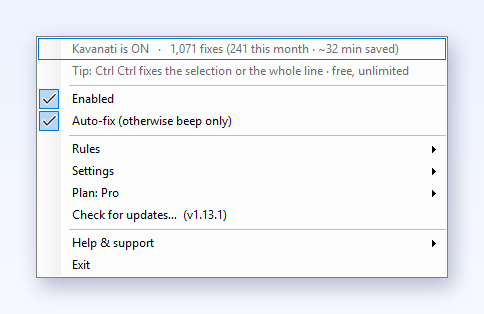
Kavanati spots a word typed in the wrong keyboard language and fixes it before you notice: in WhatsApp, email, Word and every other app. It all runs on your computer, and no keystroke ever leaves it.
Installs from the Microsoft Store: checked by Microsoft, no security warnings.
No Microsoft Store on this computer (some work PCs)? Direct download
💻 Kavanati is desktop software for Windows and Mac. On your phone? Send yourself the link and install it at your computer in a minute.
Free to start: 7 days unlimited, then 15 auto-fixes a day · Pro unlimited · Windows & Mac · no account
Kavanati is young and can get a word wrong. If you hit a bug or an odd case, tell us — every report helps us a lot.
Try it yourself
The real Kavanati engine, running in your browser. Nothing you type leaves the page.
 Kavanati types what you meant:
Meet Alt and Shift
Episode 1 · 33 seconds · in Hebrew, with subtitles
 New: play with themGibberish! is a free daily word game: guess what was typed on the wrong keyboard. Hebrew and English, on your phone too.
Play →
New: play with themGibberish! is a free daily word game: guess what was typed on the wrong keyboard. Hebrew and English, on your phone too.
Play →
 New: Key Dash — Alt & Shift on the runA runner on a giant keyboard: catch every Hebrew letter on the key it sits on, outrun Caps Lock, dress the duo. Free, on your phone too.
Run →
New: Key Dash — Alt & Shift on the runA runner on a giant keyboard: catch every Hebrew letter on the key it sits on, outrun Caps Lock, dress the duo. Free, on your phone too.
Run →
What it looks like
Sound familiar?
Probably from five minutes ago. Every wrong-layout moment steals a few seconds and a little dignity — Kavanati ends them all.
You fire off a quick reply — it lands as “akuo nv guxrת”. Not a word, in any language. And now they’re watching you type it again.
Name, email, message — typed, submitted, bounced. Half of it was gibberish. Clear it all, switch language, start again.
Zero results for “שדrקא”. Not because it doesn’t exist — because that’s not the word. Clear, switch, retype.
Head down, typing fast, in the zone. You look up: three lines of gibberish. Select all. Delete. Start over.
Why it’s different
It spots the wrong layout mid-word and flips the garble to what you meant — in any app, system-wide, without being asked.
Typed a full sentence before you noticed? Double-tap Ctrl (Windows) or press ⌘P (Mac) — the entire line flips at once.
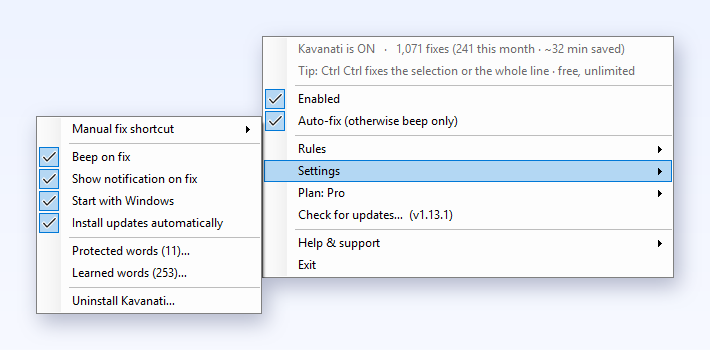
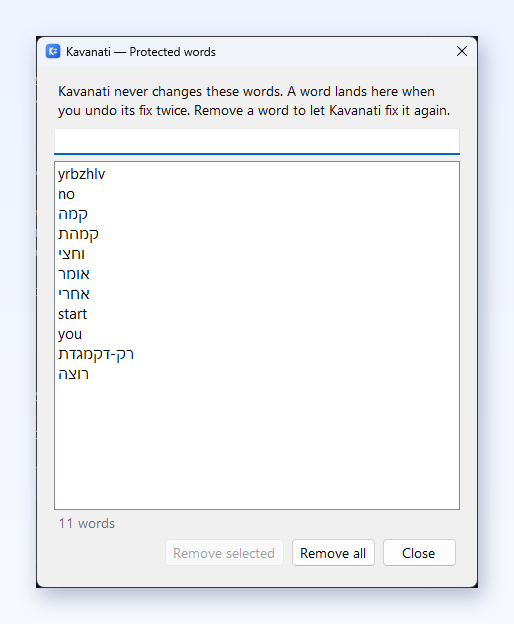
It never touches password fields and never rewrites text you got right. Ctrl+Z undoes a fix instantly, and a word you undo twice with the fix shortcut is protected for good.
One tool, everywhere you type
WhatsApp arguments, work email, code, a search box at 2 a.m. — Kavanati covers the whole system, not one app at a time.
Privacy
What you type stays between your keyboard and your screen. Kavanati works like a spell-checker, not a cloud service — all local, in memory.
Detection and correction run entirely on your computer. No keystroke is sent or logged. The only words kept are ones you protect or that it learns as your vocabulary, in a local settings file you can clear.
To fix a word, Kavanati has to know which keys you pressed, like any spell-checker. Each word is checked in memory and then forgotten: never sent, never collected. On its own the app asks the internet one thing, “is there a new version?” (paid plans also verify their license), and any firewall will confirm it.
Fields your system marks as password fields are skipped entirely: Kavanati doesn’t read, store or fix what you type there.
For teams & organizations
Kavanati saves every bilingual employee the day’s akuo moments, in every app, with nothing leaving their computer. Organizations get their own plan.
No cloud, no accounts, nothing typed is sent. A security overview is ready for your IT team.
On Windows it’s one file, with no installer and no admin rights. IT sets the license key once (Group Policy, Intune or MDM) and every computer activates itself.
One key for the whole team, from ₪25 per computer a month, billed yearly, cheaper at volume. Start with a free 30-day pilot.
Questions
Get Kavanati
No Microsoft Store on this computer (some work PCs)? Direct download
Kavanati-windows.exe. Windows asks once: More info → Run anyway.Ctrl (or press Pause) to flip a whole line.Kavanati.app to Applications and open it. It’s notarized by Apple, so macOS just asks you to confirm.⌘P to flip a whole line.Kavanati is young and can get a word wrong. If you hit a bug or an odd case, tell us — every report helps us a lot.
Free to start · Windows & Mac · 60-second setup · no account.
No Microsoft Store on this computer (some work PCs)? Direct download
Kavanati is young and can get a word wrong. If you hit a bug or an odd case, tell us — every report helps us a lot.
A question, a business inquiry, or a partnership? Leave a message and I'll get back to you personally.
Kavanati fixes it automatically, in every app. Start free, with 7 days of unlimited use.
No account · no credit card · runs in the tray
It fixes typing on Windows and Mac. Send yourself the link now, and install it when you're at your computer: it takes a minute.
Then open the message in WhatsApp on your computer and click the link.
or get it by email
Why does this appear? Kavanati is new, independent software, and Windows and the browser show these screens for every app that is still building a reputation. They are not warnings about a problem. Updates arrive inside the app without them. Everything runs 100% on your computer.
These permissions let Kavanati see which keys you press so it can fix the language. Nothing you type leaves your Mac.
Your download has started. Setup takes under a minute — the quick guide shows you how.
Quick setup guide